2) Extensive-form games#
In the first tutorial, we used Gambit to set up the Prisoner’s Dilemma, an example of a normal (strategic) form game.
Gambit can also be used to set up extensive-form games; the game is represented as a tree, where each node represents a decision point for a player, and the branches represent the possible actions they can take.
Example: One-shot trust game with binary actions
Kreps (1990) introduced a game commonly referred to as the trust game. We will build a one-shot version of this game using Gambit’s game transformation operations.
The game can be defined as follows:
There are two players, a Buyer and a Seller.
The Buyer moves first and has two actions, Trust or Not trust.
If the Buyer chooses Not trust, then the game ends, and both players receive payoffs of
0.If the Buyer chooses Trust, then the Seller has a choice with two actions, Honor or Abuse.
If the Seller chooses Honor, both players receive payoffs of
1;If the Seller chooses Abuse, the Buyer receives a payoff of
-1and the Seller receives a payoff of2.
In addition to pygambit, this tutorial introduces the draw_tree package, which can be used to draw extensive form games in Python. If you’re running this tutorial on your local machine, you’ll need to install the requirements for draw_tree, which include LaTeX, in order to run the draw_tree cells. Another option for visualising extensive form games is to install the Gambit GUI and use it to load the EFG file generated at the end of
this tutorial.
[1]:
from draw_tree import draw_tree

import pygambit as gbt
We create a game with an extensive representation using Game.new_tree:
[2]:
g = gbt.Game.new_tree(
    players=["Buyer", "Seller"],
    title="One-shot trust game, after Kreps (1990)"
)
The tree of the game contains just a root node, with no children:
[3]:
draw_tree(g)
[3]:

To extend a game from an existing terminal node, use Game.append_move. To begin with, the sole root node is the terminal node.
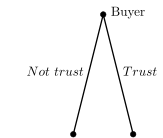
Here we extend the game from the root node by adding the first move for the “Buyer” player, creating two child nodes (one for each possible action).
[4]:
g.append_move(
    g.root,  # This is the node to append the move to
    player="Buyer",
    actions=["Trust", "Not trust"]
)
[5]:
draw_tree(g)
[5]:
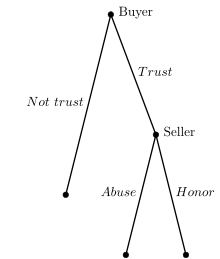
We can then also add the Seller’s move in the situation after the Buyer chooses Trust:
[6]:
g.append_move(
    g.root.children["Trust"],
    player="Seller",
    actions=["Honor", "Abuse"]
)
[7]:
draw_tree(g)
[7]:
Now that we have the moves of the game defined, we add payoffs.
Payoffs are associated with an Outcome; each Outcome has a vector of payoffs, one for each player, and optionally an identifying text label.
First we add the outcome associated with the Seller proving themselves trustworthy:
[8]:
g.set_outcome(
    g.root.children["Trust"].children["Honor"],
    outcome=g.add_outcome(
        payoffs=[1, 1],
        label="Trustworthy"
    )
)
[9]:
draw_tree(g)
[9]:
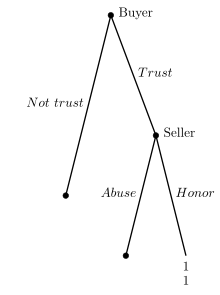
Next, the outcome associated with the scenario where the Buyer trusts but the Seller does not return the trust:
[10]:
g.set_outcome(
    g.root.children["Trust"].children["Abuse"],
    outcome=g.add_outcome(
        payoffs=[-1, 2],
        label="Untrustworthy"
    )
)
[11]:
draw_tree(g)
[11]:
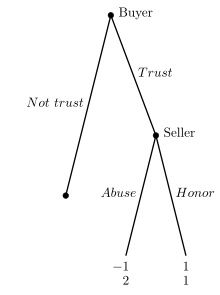
And, finally the outcome associated with the Buyer opting out of the interaction:
[12]:
g.set_outcome(
    g.root.children["Not trust"],
    g.add_outcome(
        payoffs=[0, 0],
        label="Opt-out"
    )
)
[13]:
draw_tree(g)
[13]:
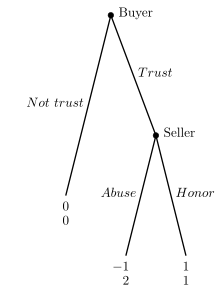
Nodes without an outcome attached are assumed to have payoffs of zero for all players.
Therefore, adding the outcome to this latter terminal node is not strictly necessary in Gambit, but it is useful to be explicit for readability.
Loading games from the catalog#
Gambit includes a catalog of standard games that can be loaded directly by name. You can list all the available games like so:
[14]:
gbt.catalog.games()
[14]:
| Game | Title | |
|---|---|---|
| 0 | bagwell1995 | Bagwell (GEB 1995) commitment and (un)observab... |
| 1 | myerson1991/fig2_1 | A simple Poker game |
| 2 | myerson1991/fig4_2 | Myerson (1991) Figure 4.2 |
| 3 | reiley2008/fig1 | Stripped-down poker (Reiley et al 2008) |
| 4 | selten1975/fig1 | Selten's horse (Selten IJGT 1975, Figure 1) |
| 5 | selten1975/fig2 | Selten (IJGT 1975) Figure 2 |
| 6 | selten1975/fig3 | Selten (IJGT 1975) Figure 3 |
| 7 | watson2013/exercise29_6 | Princess Bride signaling game (from Watson) |
| 8 | watson2013/fig29_1 | Job-market signaling game (version from Watson) |
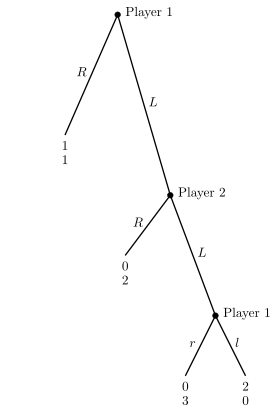
You can then load a specific game by its name. For example:
[15]:
g = gbt.catalog.load("selten1975/fig2")
draw_tree(g)
[15]:
Saving and reading extensive-form games to and from file#
You can use Gambit to save games to, and read from files. The specific format depends on whether the game is normal or extensive-form.
Here we’ll save the Trust game (extensive-form) to the .efg format. Run these lines of code in new code cells if you’re running the tutorial locally:
g.to_efg("trust_game.efg")
You can easily restore the game object from file like so:
gbt.read_efg("trust_game.efg")
References#
Kreps, D. (1990) “Corporate Culture and Economic Theory.” In J. Alt and K. Shepsle, eds., Perspectives on Positive Political Economy, Cambridge University Press.